TL;DR
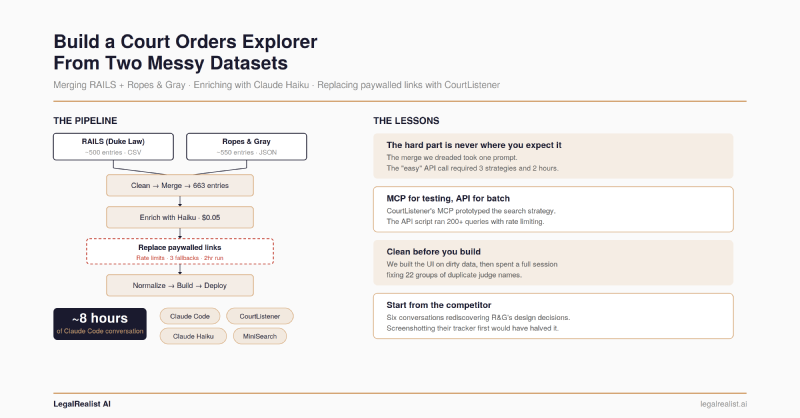
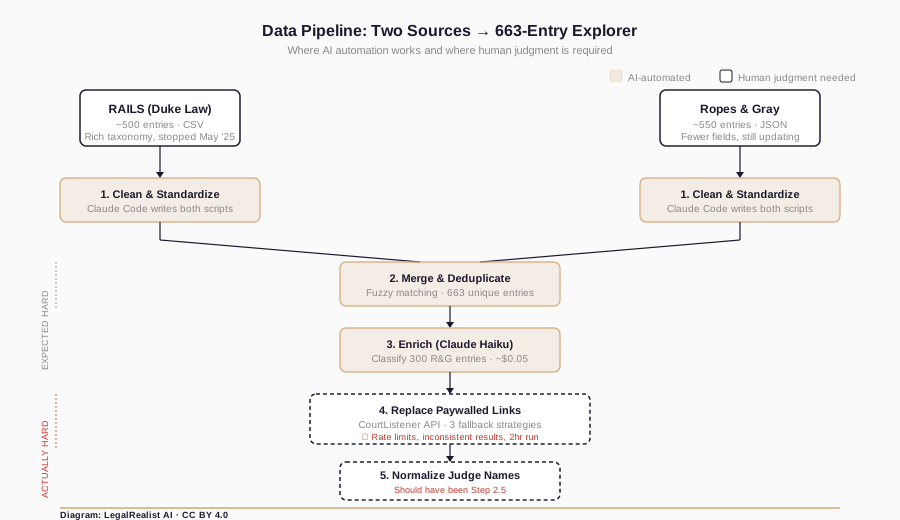
- Two datasets, different schemas, 40% overlap – and the merge wasn’t the hard part. Fuzzy matching across RAILS and Ropes & Gray took one prompt. Replacing paywalled links via the CourtListener API is where the project actually stalled.
- Claude Haiku classified 300 entries for a few cents. Batch API calls filled missing RAILS-specific fields using the RAILS taxonomy as the classification scheme – cheap, reliable structured extraction.
- The “easy” step nearly killed the project. Aggressive rate limits, inconsistent search results, and a fallback strategy that grew from one method to three turned a “swap the URL” task into a two-hour babysitting job.
- Skip the boring steps and they’ll find you later. The explorer shipped on dirty data. A full conversation went to fixing judge name duplicates that five minutes of deduplication during the merge step would have caught.
- Run your data validation pass before building the UI. The traditional clean-validate-analyze-build workflow exists for a reason. Vibe coding makes skipping ahead easier, not smarter.
- The full pipeline is on GitHub. Fork it, swap in your own dataset, or improve the explorer.
Corrections & Updates
- June 7, 2026: Corrected the dataset count from 663 to 643 entries, matching the companion post after additional data cleaning.
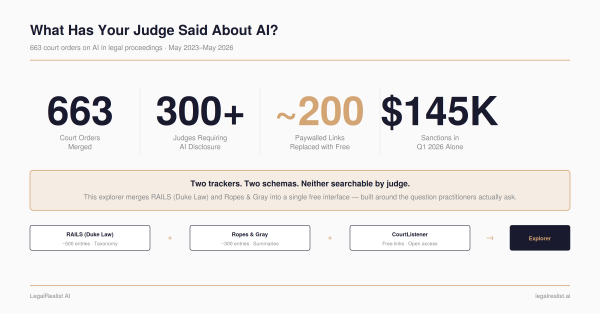
Two public trackers catalog court orders on AI use in legal proceedings. RAILS, built by Duke Law’s Center on Law & Technology, launched in March 2024 with roughly 50 entries and grew to ~500 before stopping updates in May 2025. Ropes & Gray’s AI Court Order Tracker launched the same month, still updates weekly, and now catalogs over 550 entries. Both are excellent. Neither is complete. They use different schemas, different taxonomies, and different link sources – many of which point to paywalled Lexis or Westlaw pages.
The result: a single dataset of 643 court orders, enriched with Claude Haiku, with ~200 paywalled links replaced by free CourtListener alternatives – all through conversational prompting with Claude Code. The whole project took about eight hours of conversation spread across sessions. (For the substantive analysis of what the 643 orders reveal, see the companion post)
The Raw Material#
RAILS provides a CSV export with rich classification: order type (standing order, local rule, case management order), requirements imposed (disclosure, certification, verification), who the order applies to (all filers, AI users only, pro se litigants), and consequences for noncompliance. Ropes & Gray provides a JSON feed with fewer fields – judge, court, date, summary, and a link – but more recent coverage. About 40% of entries appear in both trackers under slightly different names.
The first Claude Code prompt:
Write a Python script to clean the RAILS CSV into a standardized schema.The second:
Convert the Ropes & Gray JSON into the same schema.
``` Two scripts, two clean datasets, same field structure. The hard part isn't the cleaning – it's deciding on the target schema. RAILS has the richer taxonomy, so we used it as the standard and left R&G-only fields empty for enrichment later.

## Merge and Deduplicate

Two datasets with different schemas, overlapping coverage, and inconsistent naming – the merge seemed like the place where the project would stall.

It wasn't.

```text
Combine the cleaned datasets, deduplicating on case name + court + date.
The merge script uses fuzzy matching on case name (with court and date as hard constraints) to catch entries named differently across sources – “In re: Use of Artificial Intelligence” in RAILS versus “Standing Order re AI-Generated Content” in R&G for the same judge’s order. Output: 643 unique entries.
The dreaded merge took one prompt and a few minutes of spot-checking.
Enrich With an LLM#
The 300-odd R&G-only entries now have clean names, judges, courts, and summaries – but no RAILS-style classifications. Order type, requirements, applicable-to categories: all empty.
Each entry has a summary paragraph describing what the order does. Classifying it into a fixed taxonomy based on that summary is structured extraction – pattern-matching against known categories, not open-ended generation. Hallucination risk is low because the output space is constrained: the model picks from a predefined list, not inventing prose.
Write a script that sends R&G-only entries to Claude Haiku in batches, asking it to classify each entry's order type, requirements, and applicable-to fields based on the summary text. Use the RAILS taxonomy as the classification scheme.Claude Code produced two scripts: one to generate batched API calls, another to apply the results back to the dataset. Cost: a few cents for 300 entries. This is LLM use at its best – high-volume, narrow, verifiable, and cheap enough that you don’t think about it.
Replace Paywalled Links#
This should have been the easiest step. Many entries link to Lexis or Westlaw – useless without a subscription. CourtListener, maintained by the Free Law Project, has free versions of most federal court orders. Find the same order on CourtListener, swap the URL. Conceptually simple. In practice, the hardest step in the pipeline.
The rate limit wall. The first script Claude Code wrote hit CourtListener’s API with no delay between requests. After about fifteen queries, every response came back 429 – the server’s way of saying “too many requests, slow down.” We added a one-second delay. Still 429s. Five seconds. Still 429s after a burst. We eventually settled on 20-second delays between requests with exponential backoff on failures – meaning the script would wait 20 seconds, then 40, then 80 if it kept getting throttled. A batch of 200 entries now takes about two hours. You can’t walk away from it, either – if the backoff escalates too far, the script stalls and you need to restart it with an offset to skip already-processed entries.
The search strategy problem. The first version searched by case name only. The results were inconsistent – some orders aren’t filed as standalone opinions on CourtListener, they’re docket entries or attachments to other filings. A search for “Standing Order Regarding Artificial Intelligence” might return nothing, while searching for the judge’s name plus “AI” might find the docket.
So the script grew. Version one: search by case name. Version two: add docket number search as a first pass (most precise when the data has one, which is maybe a third of entries). Version three: add a fallback opinion search for entries where the first two methods struck out. Each fallback required a different API endpoint, different query formatting, and different result parsing. Claude Code wrote each version, but the strategy – deciding when to fall back and what to try next – came from testing interactively and seeing what the API actually returned.
MCP for testing, API for the batch. This is where CourtListener’s MCP server proved useful – not for the batch run, but for figuring out the search logic. The
MCP lets you query CourtListener conversationally inside Claude: Search for Judge Brantley Starr's AI standing order in the Northern District of Texas. See what comes back. Try a different query. Discover that standing orders often live as docket entries rather than opinions. That interactive loop – which would have been tedious as edit-run-read cycles on a Python script – took minutes in the
MCP. Once the search strategy worked conversationally, we translated it into the batch script.
The final script replaced ~200 paywalled links with free alternatives. Some entries – maybe 20–30 – couldn’t be found on CourtListener at all (state court orders, very recent entries not yet indexed, orders filed as attachments that CourtListener doesn’t surface separately). Those kept their original links. The replacement rate wasn’t perfect, but it turned a resource that required a Lexis subscription into one that mostly doesn’t.
In hindsight, skip the API. The simpler approach would have been to use AI agents to search the open web for each order directly – no API keys, no rate limits, no multi-strategy fallback chain. The orders are public documents; most are findable with a well-constructed search query. An agent that can browse and extract a URL is easier to build and maintain than a script fighting a rate-limited API with three fallback strategies. If I were rebuilding this step, I’d crawl instead of query.
Normalize Everything Else#
This should have happened before the explorer, not after. Vibe coding tempts you to skip straight to the visible output because it’s more satisfying to watch an explorer render than to audit a JSON file for name variants. The temptation won. The UI shipped on dirty data, and a full conversation went to fixing problems that a five-minute deduplication pass during the merge step would have caught.
The problem: judges appearing multiple times in the sidebar list. “Judge Scott Palk” and “Judge Scott L. Palk” and “Judge Scott Lawrence Palk” – same person, three cards. “Judge” versus “Magistrate Judge” title variations created more splits. Claude Code found 22 groups of duplicates when we asked it to analyze the dataset for near-duplicate names. A Python dictionary mapping old names to canonical forms fixed 27 entries. Five minutes of work – after an hour of wondering why the explorer looked wrong.
Build the Explorer#
The prompt we should have started with:
Look at the Ropes & Gray court order tracker. Build a similar explorer but improved: group entries by judge instead of a flat table, add a choropleth map, add fuzzy search, and use the free CourtListener links.The project didn’t start there. It started with a vague build an explorer for this dataset and got back a generic data table. Then we iterated toward what R&G had already built – adding a map, adding filters, adding judge grouping – rediscovering their design decisions one conversation at a time. Six conversations of back-and-forth, most of it subtractive: removing a stats bar, removing date range filters, removing a “has link” chip, removing source badges. Each seemed useful in isolation; together they cluttered the interface. Asking what do you NOT need? upfront would have been one pass instead of six.
Claude Code built the final version as ~900 lines of HTML, CSS, and JavaScript in a single file – no build tools, no framework. The components: an SVG choropleth map colored by order count per state, MiniSearch for fuzzy full-text search, a filter system with dropdowns and boolean chips, a judge-grouped list sorted by entry count, and a timeline detail panel with type badges and requirement pills.
A separate analysis script generates 12 Plotly charts from the dataset: cumulative growth over time, a sanctions timeline, orders by state, document types, requirements breakdown. Each chart started as a standalone HTML file with the full Plotly library embedded – 4.8MB per chart. One prompt to replace the embedded library with a CDN link dropped each file to ~8KB.
What This Teaches About Vibe Coding#
The AI Court Orders Explorer is a Level 3 tool on the AI use spectrum: an ad hoc application built by describing what you want in natural language. Eight hours of conversation, spread across sessions, to go from two misaligned CSVs to a deployed explorer with 643 entries, free links, and interactive charts.
Vibe coding makes it easy to build fast. It doesn’t change where the problems actually live. The data pipeline steps – cleaning, merging, enriching – were smooth because they’re self-contained: transform this input into that output. The steps that fought us involved external dependencies (CourtListener’s rate limits and search behavior) and skipped fundamentals (data validation before visualization). Claude Code executes solutions. It can’t predict that the API will throttle you after fifteen requests, or that standing orders live in docket entries rather than opinions, or that your judge names have 22 groups of duplicates.
The traditional workflow of clean, validate, analyze, then build exists because people have been learning that lesson for decades. Vibe coding doesn’t exempt you from it – it just makes the temptation to skip ahead harder to resist.
The entire data pipeline, merge scripts, and explorer source code are open source at github.com/legalrealist/AI-orders-explorer. If you want to adapt this for a different set of court orders – or improve what’s already there – fork the repo and experiment.
Further Reading#
- AI Orders Explorer – Source Code. The full data pipeline and explorer. Fork it, improve it, or adapt it for your own dataset.
- RAILS AI Use in Courts Tracker. Duke Law’s original tracker (last updated May 2025).
- Ropes & Gray AI Court Order Tracker. The enhanced version with advanced search and filtering.
- CourtListener. Free Law Project’s open legal data platform.
- CourtListener MCP Server. Free Law Project’s announcement of the Claude integration.
- CourtListener API Client & MCP. The official Python SDK and MCP server source.
- Claude Code Overview. Anthropic’s documentation for the CLI coding tool.
- Law360 Pulse AI Tracker. Law360’s federal judge AI order tracker.
- MiniSearch. The lightweight fuzzy search library used in the explorer.
This post is part of the Vibe Code With Me series on LegalRealist AI. It is intended for informational and educational purposes only and does not constitute legal advice. The tools and techniques described here reflect publicly available information as of the publication date and are subject to rapid change. AI-generated code requires human review and testing before use on client work.