TL;DR
- RAG rediscovers knowledge from scratch on every question. Karpathy’s LLM Wiki flips this: the LLM builds a persistent, cross-referenced wiki first, then queries compiled knowledge instead of raw documents.
- Law school material is structured enough to compile well. Doctrines have elements, cases follow predictable formats, and the cross-references between subjects – consideration in Contracts linking to reliance damages in Remedies – are where exam insights live.
- Setup takes ten minutes, not ten hours. Clone the repo, drop your outlines in
raw/, open Claude Code, type “ingest.” One outline generates 20-40 wiki pages.- Obsidian and Quartz turn the output into something you’d actually use. Graph view shows which doctrines connect across courses. Quartz publishes the whole thing as a free static website.
A 2L I know spent reading period rereading five course outlines, highlighting the same passages she’d highlighted in October. The consideration doctrine in her Contracts I outline never linked to promissory estoppel in Contracts II or reliance damages in Remedies – those connections either happened in her head or didn’t happen at all. This post builds a tool that makes them automatically: an AI reads your outlines, extracts every doctrine and case, cross-references them across courses, and produces a single knowledge base you can browse like Wikipedia.
The Idea#
In April 2026, Andrej Karpathy – co-founder of OpenAI, former Tesla AI director – published a gist on GitHub describing a pattern he called the LLM Wiki. Within days it had 5,000+ stars. The idea hit a nerve because it solves a problem every heavy LLM user recognizes.
Most AI document tools use RAG: upload files, ask a question, the model retrieves chunks, generates an answer. Nothing accumulates. Ask something that requires synthesizing five documents, and the LLM pieces together fragments from scratch every time.
Karpathy’s pattern flips this. Instead of querying raw documents, the LLM builds a wiki first – structured markdown pages with cross-references, contradictions flagged, synthesis already done. When you add a new source, the LLM reads it and integrates it into existing pages. The knowledge compounds. You never write the wiki yourself – the LLM does all the summarizing, cross-referencing, and bookkeeping. You curate sources, ask questions, and review.
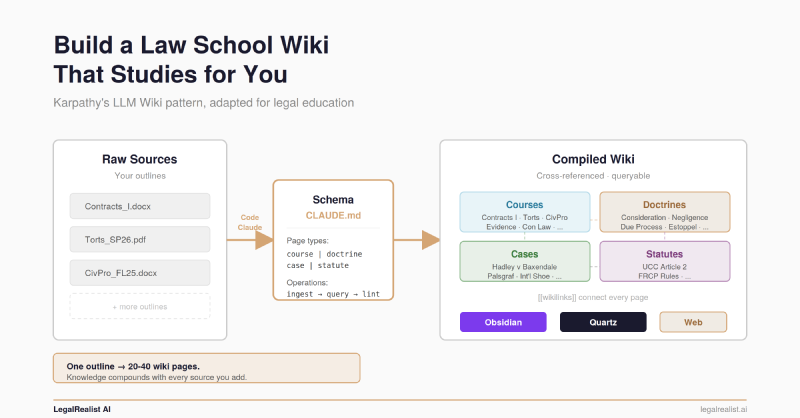
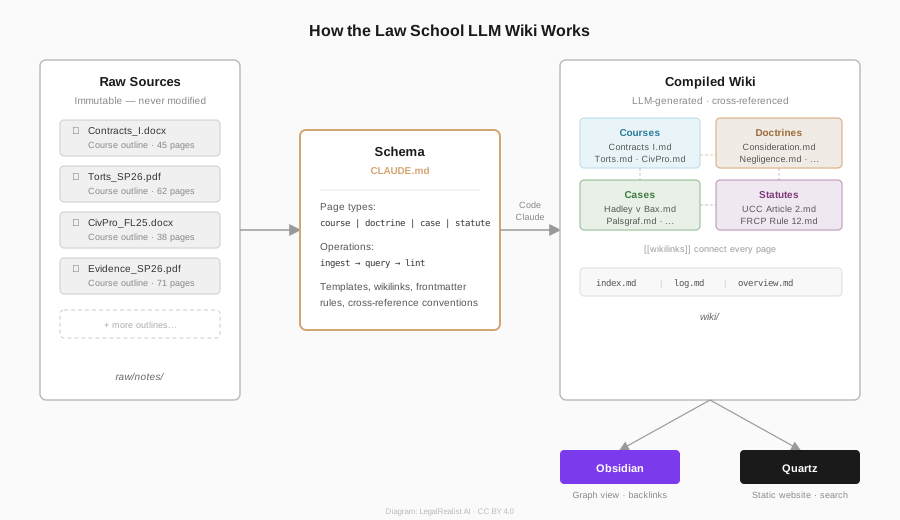
Three layers: raw sources (immutable documents the
LLM reads but never modifies), the wiki (
LLM-generated markdown pages it owns entirely), and the schema (a CLAUDE.md file telling the
LLM how to structure everything). Three operations: ingest (process a new source, create/update pages), query (search the wiki, synthesize answers), and lint (health-check for orphan pages, broken links, contradictions).
Why Law School#
Legal material maps onto this pattern better than almost any domain. Doctrines have structured elements – negligence requires duty, breach, causation, damages. Cases follow predictable formats – facts, holding, reasoning, significance. The LLM extracts these reliably into consistent page templates.
The real payoff is cross-course synthesis. Due process appears in Constitutional Law, Civil Procedure, Criminal Procedure, and Administrative Law. A stack of outlines treats it in isolation within each course. The wiki links them. Query “due process across all courses” and you get a synthesized answer no single outline can produce.
The law-school-llm-wiki repo adapts Karpathy’s pattern with four page types – courses, doctrines, cases, and statutes – and a CLAUDE.md schema tailored to how law students actually need to access the material. A live demo built from actual outlines covers 21 courses with hundreds of cross-referenced pages.
The Walkthrough#
What You Need#
- Claude Code (CLI or Desktop) with a paid Anthropic plan (Pro, Max, Team, or Enterprise)
- Your course outlines in PDF, Word, or plain text
- Git installed on your machine
- Optionally: Obsidian (free) for browsing, Node.js v22+ for Quartz publishing
Step 1: Clone and Add Your Outlines#
git clone https://github.com/legalrealist/law-school-llm-wiki.git
cd law-school-llm-wiki
The repo has three things that matter: raw/ (where your source material goes), wiki/ (where Claude builds the knowledge base), and CLAUDE.md (the schema that tells Claude how to do it).
Drop your outlines into raw/notes/:
raw/
├── notes/
│   ├── Contracts_I_FL25.docx
│   ├── Torts_SP26.pdf
│   └── CivPro_FL25.docx
├── articles/        ← law review articles, secondary sources
├── papers/          ← case PDFs, statutes, supplements
└── extracted/       ← pre-extracted text (optional, speeds ingestion)
If your outlines are long PDFs, pre-extracting the text into raw/extracted/ speeds things up significantly. Name the text file to match the source – Contracts_I_FL25.txt for Contracts_I_FL25.docx. Claude checks extracted/ first before parsing binary formats.
Step 2: Ingest Your First Outline#
Open Claude Code in the project directory:
claudeClaude reads CLAUDE.md automatically – no configuration needed. It already knows the project structure, the page types, the templates, and the workflows. Tell it to ingest:
Ingest raw/notes/Contracts_I_FL25.docxClaude reads the outline, then walks through a cycle: it discusses key takeaways with you, creates the course page (wiki/courses/Contracts I.md), creates doctrine pages for every testable rule (Consideration, Promissory Estoppel, Statute of Frauds, etc.), creates case pages for significant cases (Hadley v Baxendale, Lucy v Zehmer, etc.), wikilinks everything together, updates wiki/index.md, and appends an entry to wiki/log.md.
One outline typically generates 20-40 wiki pages. A Contracts I outline might produce:
wiki/
├── index.md                              ← updated catalog
├── log.md                                ← "2026-05-12 | ingest | Contracts I"
├── courses/
│   └── Contracts I.md                    ← course summary + exam approach
├── doctrines/
│   ├── Consideration.md                  ← elements, exceptions, policy, cases
│   ├── Promissory Estoppel.md
│   ├── Statute of Frauds.md
│   ├── Offer and Acceptance.md
│   ├── Breach of Contract.md
│   └── ...
├── cases/
│   ├── Hadley v Baxendale.md             ← facts, holding, rule, significance
│   ├── Lucy v Zehmer.md
│   ├── Hamer v Sidway.md
│   └── ...
└── statutes/
    └── UCC Article 2.md
Each doctrine page follows the same template. Here’s what wiki/doctrines/Consideration.md looks like:
---
type: doctrine
tags: [contracts, formation, consideration]
courses: [Contracts I]
updated: 2026-05-12
---
# Consideration

## Rule Statement
A contract requires consideration: a bargained-for exchange in which
each party incurs a legal detriment or receives a legal benefit.

## Elements
1. **Bargained-for exchange** – the promise induces the detriment and
   the detriment induces the promise
2. **Legal detriment** – the promisee does something they had no prior
   legal duty to do, or refrains from something they had a legal right to do

## Exceptions / Limitations
- Past consideration is not consideration ([[Mills v Wyman]])
- Moral obligation + subsequent promise ([[Webb v McGowin]])
- Pre-existing duty rule ([[Alaska Packers v Domenico]])

## Key Cases
- [[Hamer v Sidway]] – forbearance as legal detriment
- [[Dougherty v Salt]] – gratuitous promise unenforceable
- [[Batsakis v Demotsis]] – adequacy not required

## Policy Rationale
Consideration doctrine serves as a gatekeeping function...

## Exam Approach
When you see a promise without obvious exchange, check...

## Cross-References
- [[Promissory Estoppel]] – substitute when consideration fails
- [[Statute of Frauds]] – writing requirement even with consideration
- [[UCC Article 2]] – firm offer rule (§ 2-205) modifies common law
Every [[wikilink]] connects to another page in the wiki. When you later ingest Contracts II, Claude doesn’t start fresh – it updates the existing Consideration page to add remedies content, creates new doctrine pages for topics first covered in that course, and links them to what’s already there.
Step 3: Browse in Obsidian#
Open the wiki/ directory as an Obsidian vault (File → Open folder as vault → select wiki/). Everything works immediately: wikilinks resolve, backlinks appear at the bottom of each page, and graph view shows the full network of connections.
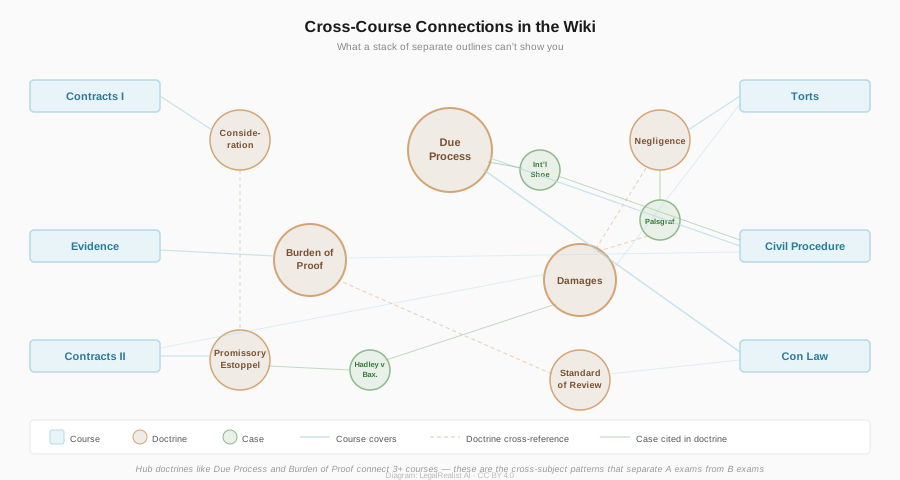
The graph view is where this approach pays off. After ingesting a few courses, you can see which doctrines are hubs connecting multiple subjects – due process, burden of proof, standards of review – and which cases appear across courses. These are the connections that matter on exams and that a stack of separate outlines can’t reveal.
For power users, the Dataview plugin (free, install from Obsidian’s community plugins) unlocks queries over the wiki’s YAML frontmatter. Create a note with this Dataview block and it dynamically generates a table:
```dataview
TABLE courses AS "Courses", updated AS "Updated"
FROM "doctrines"
WHERE contains(courses, "Contracts I")
SORT file.name ASC
```
That gives you every doctrine covered in Contracts I, sortable and always current as the wiki grows.
Step 4: Query and Lint#
With several outlines ingested, start querying:
What are the elements of promissory estoppel, and which courses cover it?Compare the consideration doctrine across Contracts I and Contracts II.Give me an exam checklist for a contracts issue spotter.Claude searches the wiki’s index, reads the relevant pages, and synthesizes answers with citations to specific wiki entries. Good answers can be saved back as new wiki pages – a comparison you asked for, an exam checklist, a cross-course synthesis – so your explorations compound in the knowledge base.
Periodically, run a lint check:
Run a lint check on the wiki.Claude scans for orphan pages (no inbound links), broken wikilinks, conflicting rule statements across courses (one outline says three elements, another says four), and incomplete entries missing key sections. The lint output tells you what to fix and suggests sources to look for.
Step 5: Publish with Quartz#
If you want a shareable website with search, graph view, and backlinks – all the Obsidian features, in a browser – Quartz turns the wiki/ folder into a free static site.
git clone https://github.com/jackyzha0/quartz.git
cd quartz
npm i
Copy your wiki contents into Quartz’s content directory:
cp -r /path/to/law-school-llm-wiki/wiki/* content/Preview locally:
npx quartz build --serveOpen localhost:8080 and you’ll see your wiki as a navigable website with full-text search, interactive graph view, backlinks panel, and popover previews on hover. Deploy to GitHub Pages for free – the entire site is static, no server or database needed.
A live example is running at legalrealist.github.io/law-school-llm-wiki-example, built from 21 courses’ worth of actual law school outlines.
What It Gets Wrong#
The wiki is lossy. It compresses 300-page outlines into structured pages, and details get lost – exact statutory language, a professor’s particular framing of a dissent, edge cases. If the LLM mischaracterizes a holding during ingestion, that error persists and influences future queries. A RAG system returns to the original document every time, giving each query a fresh chance to get it right.
For exam prep, these trade-offs cut in the right direction. The problem during reading period isn’t access to raw text – you have the outlines. The problem is synthesis: connecting doctrines across courses, building the analytical framework that turns a fact pattern into a structured answer. The wiki does this synthesis once. The raw outlines are still in raw/ for verification. And when a wiki page has an error, you correct it in one place and the fix propagates through every future query.
Adapting to Other Domains#
The CLAUDE.md schema is written for law school but the repo is designed as a template. Swap the page types – replace course | doctrine | case | statute with condition | treatment | mechanism | drug for medical school, or project | concept | pattern | library for software engineering – update the templates, rename the directories, and the same three-layer pattern works.
For practicing lawyers, this maps directly onto the knowledge management problem: a firm’s contract playbook, clause library, and practice-group standards are exactly the kind of structured knowledge that compounds well in a wiki. The difference between a playbook in SharePoint and one compiled into a queryable wiki is the difference between documentation people forget exists and knowledge that surfaces when you need it.
Further Reading#
- Andrej Karpathy’s LLM Wiki gist. The original pattern, with 5,000+ stars and dozens of implementations.
- Law School LLM Wiki repo. The adapted repo with
CLAUDE.mdschema for legal education. - Live Demo. A Quartz-published wiki covering 21 law school courses.
- Quartz. Static site generator that turns Obsidian vaults into websites.
- Obsidian. Local-first markdown editor with wikilinks, graph view, and plugins.
- Claude Code overview. Anthropic’s CLI agent that powers the ingest workflow.
- Dataview plugin. Advanced queries over Obsidian vault metadata.
- LLM Wiki: “A Bad Idea”. A fair critique of compounding errors and lossy compression.
This post is part of the Vibe Code With Me series on LegalRealist AI. It is intended for informational and educational purposes only and does not constitute legal advice. AI capabilities and features described here reflect publicly available information as of the publication date and are subject to rapid change.